
Session logging
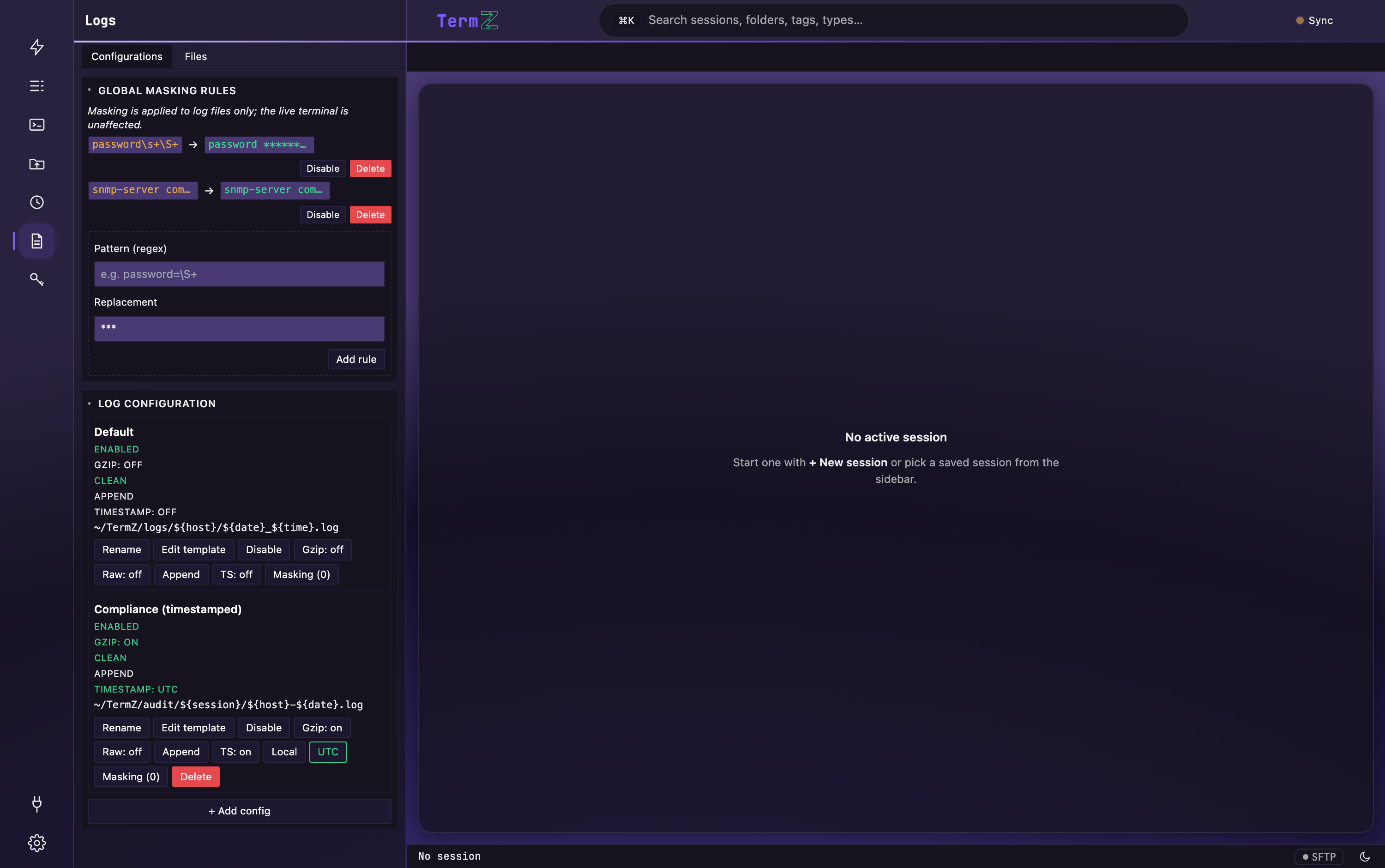
Any session can log its transcript to disk — a durable, readable record of what happened. Logging is configured from the Logs view in the activity rail, where each logging config shows its status, path template, and options.
Path templates
Section titled “Path templates”Rather than pick a filename by hand, build the log path from variables so logs
file themselves. Write a variable as ${name} (a bare {name} also works). Unknown
variables resolve to an empty string. Values are sanitized to a safe path segment —
except ${folder}, which expands into nested directories.
Session & path variables
Section titled “Session & path variables”| Variable | Expands to |
|---|---|
${session_name} |
The session’s display name |
${hostname} |
The remote host (or unknown) |
${ip} |
The resolved IP address (or unknown) |
${username} |
The session’s login username (or unknown) |
${protocol} |
ssh, telnet, serial, raw, or local |
${user} |
The local OS user running TermZ |
${folder} |
The session’s folder path, expanded to nested directories (e.g. /DC/East → DC/East/…) |
${tag:NAME} |
The value of a specific tag on the session — e.g. ${tag:env} → prod |
${counter} |
A zero-padded run counter (e.g. 0007), for uniqueness |
Date & time variables
Section titled “Date & time variables”These follow the config’s Local / UTC toggle, so folder dates match your per-line
timestamps. Spelled-out names and strftime-style aliases both work.
| Variable | Alias | Expands to |
|---|---|---|
${date} |
— | YYYY-MM-DD |
${time} |
— | HHMMSS |
${datetime} |
— | YYYY-MM-DDTHHMMSS (trailing Z when UTC) |
${year} |
${YYYY} |
4-digit year |
${month} |
${MM} |
2-digit month |
${day} |
${DD} |
2-digit day |
${hour} |
${HH} |
2-digit hour |
${minute} |
${min} / ${mm} |
2-digit minute |
${second} |
${sec} / ${ss} |
2-digit second |
Examples
Section titled “Examples”~/logs/${hostname}/${date}-${session_name}.log~/termz/logs/${year}/${year}-${month}/${year}-${month}-${day}/${datetime}_${hostname}.log~/logs/${folder}/${tag:env}/${session_name}-${datetime}.logLogging options
Section titled “Logging options”Each config (see the buttons in the panel above) toggles:
- Enabled — turn logging on/off for the config.
- Gzip — compress the transcript on close (the log viewer reads
.gztransparently). - Clean vs Raw — Clean strips control-sequence noise (cursor moves, colors) for plain readable text; Raw keeps the original byte stream.
- Overwrite vs append — reuse the file or add to it.
- Timestamp: Local / UTC — whether per-line timestamps and the date/time path variables use your local wall clock or UTC.
- Masking — attach output-masking rules (the count is shown, e.g. “Masking (0)”).
Per-line timestamps
Section titled “Per-line timestamps”With timestamps on, each line is prefixed [YYYY-MM-DD HH:MM:SS] in the mode
(Local/UTC) the config records — useful for audit trails and correlating a transcript
with events elsewhere.
Masking
Section titled “Masking”Logging honors your output masking rules, so secrets echoed during a session are redacted before they hit disk. Live terminal output is unaffected — masking applies only to the written log.
Reading your logs
Section titled “Reading your logs”The built-in log viewer opens your transcripts — including gzip-compressed ones — with search, jump-to-line, and reveal-in-folder.